Monday, 30 April 2012

First Attempt at Creating a Flip-book or Stop-motion Animation


In todays lesson we were tasked with creating a flip book so that we could experiment with different forms of animation and learn about persistance of vision (see my previous post).
I decided to make my flip book about the launch of a missile, once it reached orbit it cuts it's engine and transforms into a satelite and opens fire on a city on the planet, the smoke is then erased to show the end image, a simple "THE END"

We were all creating our flip-books and whilst creating mine I realised I did it the wrong way around, so after erasing and then recreating my flip-book I realised that the paper I drew it on was too thick to flip.
In order to finish the work set to us and salvage all the drawings I had done, I decided to seek salvation in the Android (Google Play) market place. After 2 minutes of searching I found salvation in the form of the Stop Motion Maker - KomaDori app, which is designed to quickly and effectivly create a stop motion animation with much of the hard work cut out.
'the Stop Motion Maker app on the android market place'


I began taking pictures of the images I had so far created using the app to first test make sure the animator worked, after a quick test I found it did indeed work and decided to proceed working on the rest of the animation.


The app works by allowing you to create a project, within which to store all of your images.
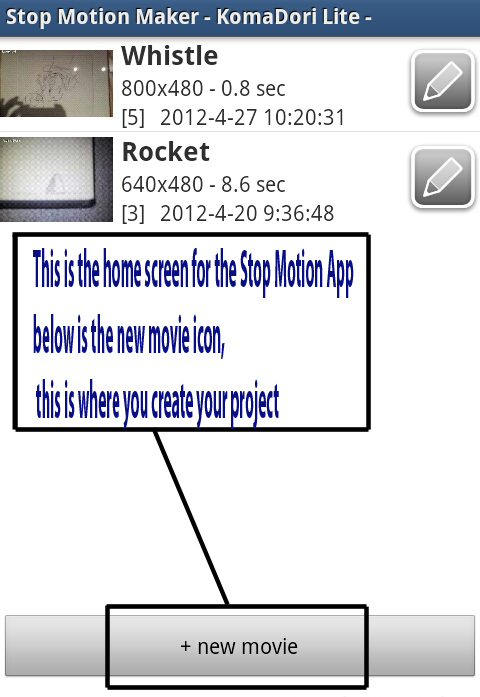

When created the app asks you to pick a resolution for the camera. All images are taken by the in app camera which can be set to be operated automatic (the camera captures images every fraction of a second or so) or manual (all camera functions are operated manually by the user).


After this the app takes you to the camera where to take a photo you just tap the screen, after you have taken all the photo's you wish to put in you animation you just click the exit button to take you to the view project section.


The view project screen, is a screen that the app takes you to when your project is completed, here you can go over your work and make sure it works the you want it.


When you have created your project you can go back and select edit mode


 On the edit screen the app allows you to save, add new images to or delete your project, you can also preview it.

Saturday, 31 March 2012

Unit 69 Concept Art

In this post i am going to put up images of all of the concept art i have created for my Unit 69 work

--Concept sketch for Panel 2 of Page 1--
 --Original hand drawn version of Page 1--
--Original hand drawn version of Page 2--
 --Original hand drawn version of Page 3--
 --Original hand drawn version of Page 4--
 --Original hand drawn version of Page 5--
-- Concept art for an Assassin character not included in the final comic--
--Concept art for a Fallen Angel not included in the final comic--
--Initial concept drawing of the Leviathan--
--Initial concept sketch for Marisha The Black Witch--
--Final concept sketch for Marisha The Black Witch--
--Initial concept sketch for Saris and Tora--
--Final concept sketch of Saris and second concept sketch of Tora--
--Final concept sketch of Tora--
--Emblem design for L.E.G.I.O.N.--

Tuesday, 20 March 2012

Concept Work


I really don't have enough on this blog, so in the next 2 weeks or so,(time allowing) I should be posting new concept art and 3D work that I'm currently working on, and maybe some of my older stuff.


(Above: This is a water colour painting I did in sixth form as part of my war propaganda pieces for my final exam.)

(Above: This is a painting of the man (dubbed vans man) from the side of my vans trainers, i painted it on my bedroom wall in acrylic paint.)

Friday, 2 March 2012

Action Plan - Flash Work

Today i showed my animation work to the class, I presented and explained the 2 peices of work i showed, my opening flash screen and my comic strip which was in the process of being edited in flash. because3 i have not completed my flash work yet or included the animation i explained to the class what i would be doing not what i have done.

the opening screen will be designed to be like some kind of futuristic/sci-fi OS (Operating System) i will design it so that part of the animation (the parts which show access denied/access granted) one will lead to the comic the others will show access denied, this will be tied in with my comic in the sense that my comic is told in a way that shows one of my characters (saris) looking back on the events after they have happened.

from the feedback i got from the class i have determined what my action plan should be, that is:
- complete my trace in flash for at least 1 page (but preferably all of them).
- turn at least 1 of said pages into an animation that helps tell the story of my comic
The main feed back i got from the class was that it was unfinished and that my concept sketches were good.

In the next 10 hours we have for our Friday lessons i will be finishing my flash work, both finishing my comic with some form of digital editing (Flash & Photo Shop) and also creating my animation, for Mel and Chris' work respectively.

Thursday, 19 January 2012

1&2 Point Perspective Drawing

Using 1pt Perspective in my Comic Part 1

In my comic strip there is going to be at least 1 panel where the scene is a 1 point perspective.
The panel in the image below(panel 2) is the panel.
This is to help me get the right perspective and proportions in the drawing (which is something I often struggle with).

Note: this is not an image of the final panel but a mock up
The below image is an photo I took to practice getting the perspective in panel 2 right, by taking the photo with my finger in the shot as a point of reference for where Saris's head is in the comic and the pink egg shaped thingie as a reference for where the Leviathan are.


I start by importing the photo I took into Photoshop and then began to overlay some lines so I could easily reference the focal point of the image and therefore the focal point of the panel in the comic strip.


I then began to draw those same lines on a piece of paper in my sketch pad.


After this I started to draw in my character Saris looking on toward the rising leviathan with an over the shoulder view, this helped add a degree of drama to the scene as well as showing the scale of the leviathan.


Then I started to add detail to the ground.

And adding detail and shading to saris, the Leviathan and adding more to the ground. Thinking the background was looking a little bare I added clouds.


2pt Perspective Drawing

As apart of my other concept work I decided to create a city/townscape using a multipoint perspective drawing. although it started out as just a 2 point perspective. I ended up adding 2 extra points to help draw certain parts of the town, hence why I say 'multipoint' perspective.

Thursday, 5 January 2012

Artists That Influence Me

Artists That Influence Me
Being an Art student most of my life has naturally resulted in me finding certain artists who i admire and aspire towards (in terms of art style and skill) being more than others.
One of those artists has inspired the way I look at art and my drawing styles, leaning me more towards the darker more surreal and horrific art styles whilst the other i have found that has achieved what I want, he has carved out a career for himself  in the games industry becoming a concept artist that uses the kind of dark and horrific styles that I myself love, going on to work at Sony Santa Monica

H.R.Giger


Easily my favourite artist of all time, i first became aware of Giger's style after the first time i watched the Alien movies, of which he designed the titular character.
I first started referencing his work during my Art GCSE work, we needed to do artist research on a famous artists and I remember not having any artists who's work I particularly admired. after my teacher recommended Giger because I was more into drawing with pencil and ink using different tones of light and dark and my work was usually quite dark and depressing, I instantly fell in love with his work.


Zachary Berger


I first became aware of Zach Berger whilst doing my concept work at college, we were told to find an artist (preferably a concept artist) who's work we liked or whom we aspired to be like and were encouraged to use different resources other than the internet to find one. Whilst looking in EDGE magazine, I came across an article on Zach and his work redesigning the Odyssey epic's Cyclops character. needless to say, just like with Giger i instantly fell in love. He now works for Sony at Sony Santa Monica as a concept artist.


Tuesday, 27 December 2011

Unit 67 Final Animation

Final Animation

The Video below is the final edit of my Unit 67 animation
(For some reason the video quality had degraded and i have been unable to remedy it)